An accessibility scan report for your Shopify store
Automated checks on up to 5 public pages. Every problem comes with a screenshot, who it affects and how to fix it, in plain English.
- Price
- $79, one time
- Pages
- Up to 5 public pages you choose
- Delivery
- Within 24 hours after payment and the domain check
- You get
- A PDF and an HTML report by email
- Rules
- WCAG 2.1 Level A and AA, automated checks, desktop and phone
What the report looks like
This is the real sample report, made on the W3C's demo site, which is built to be inaccessible on purpose. It is not a real store. Yours has the same parts.
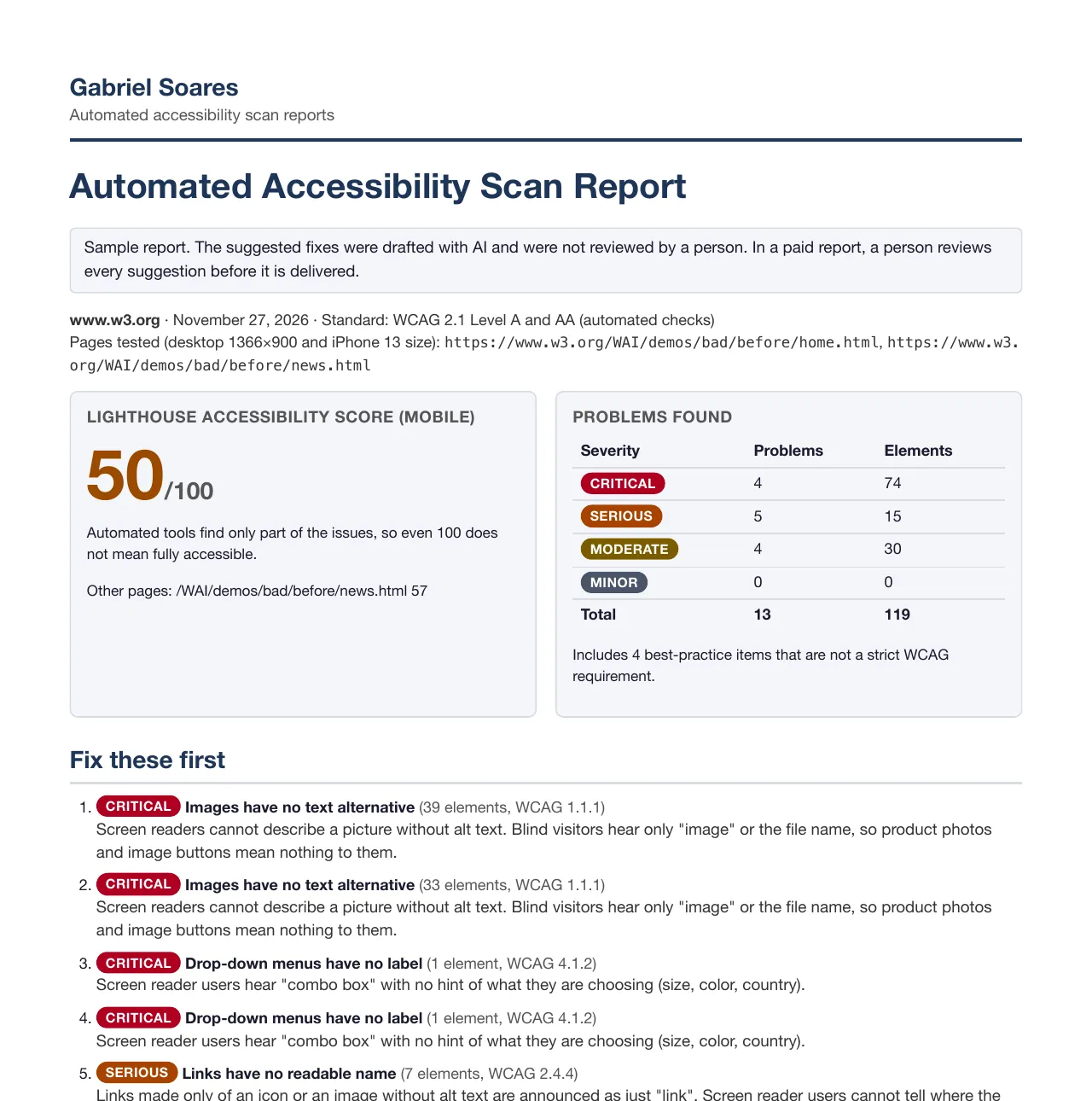
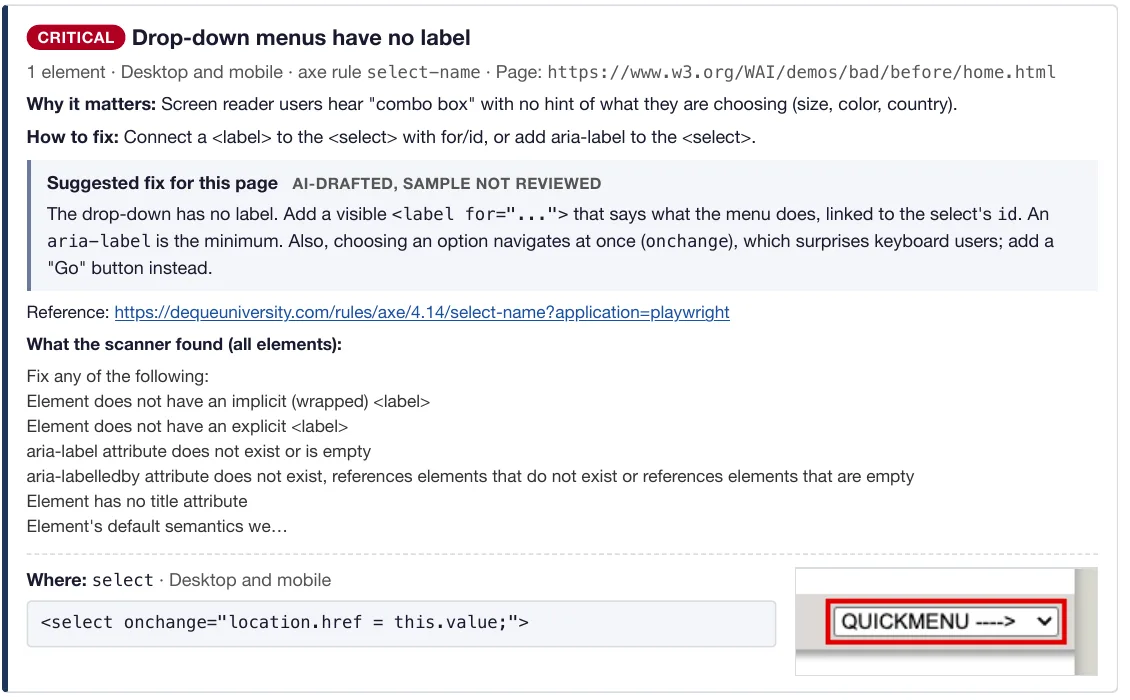
What a scan checks, and what still needs a person
Automated tools find only part of the accessibility problems on a site. The report ends with the list of checks a person still has to do, so nothing looks more finished than it is.
| Scanned | |
|---|---|
| Images with no text alternative | |
| Text that is hard to read against its background | |
| Form fields, buttons and links with no name | |
| Needs a person | |
| Whether alt text describes the product | |
| Using every menu, pop-up and form with a keyboard only | |
| How pages sound with a screen reader | |
| Form error messages | |
| Video captions and transcripts | |
| Not scanned | |
| Cart and checkout (run by Shopify) |
It is not a full audit, not a certification and not legal advice. We do not say your site meets the ADA or any other law, and no report can promise that you will not face a complaint. For legal questions, talk to a lawyer.
How it works
You pay
Then tell us your store address and up to 5 public pages, for example the home page, a collection, a product and a text page.
You prove the domain is yours
We email a code to an address at your domain. If your store has no email there, a DNS record or a small tag works instead.
We scan your public pages
Only your domain, like a visitor would. We follow your
robots.txt; if it blocks the scan, we stop and refund you.You get the report
Within 24 hours after payment and the domain check. The fix suggestions in it are drafted with AI, and a person reads each one before the report is sent.
Price and refunds
- Price
- $79, one time
- Includes
- One scan of up to 5 public pages, on desktop and phone
- Full refund
- If the scan cannot run, if your
robots.txtblocks it, or if we miss the 24-hour delivery - After delivery
- No refund once the report is delivered, because the work is done by then
Why it matters to a store
More than 1 in 4 U.S. adults have some type of disability, and many more shop with tired eyes, a small screen or one hand. When text is hard to read, buttons have no name, or a form cannot be used with a keyboard, those shoppers leave. Most fixes are small changes to the theme.
Plaintiffs filed 3,117 website accessibility lawsuits in U.S. federal court in 2025, 27% more than in 2024. A scan report does not predict or prevent legal claims; it helps you find and fix problems.
Not available yet: two more plans
Join the waiting list to hear if they happen.
- Monthly re-scan
- The same pages scanned each month, showing what got better or worse since last time.
- Manual review
- A person checks a sample of pages with a keyboard and a screen reader.
Choose one. Your email app opens with a message to us; send it to join the list. We only use your address to tell you about these plans.
Questions
Is the scan done with AI?
No. The problems are found by fixed, rule-based tests (axe-core and Lighthouse). AI is used for one thing: drafting a suggested fix for each problem on your page. To do that, the problem details and a short snippet of your page's public HTML are sent to an AI provider (Anthropic's Claude). Every suggestion is labeled "AI-drafted", and a person reads each one before the report is sent. AI suggestions can be wrong, so test any change before you publish it.
Does this mean my store meets the ADA?
No. Nobody can honestly promise that from an automated scan. The report helps you find and fix problems. For legal questions, talk to a lawyer.
Does it scan my cart and checkout?
No. Shopify runs the checkout, and most stores' robots.txt blocks the cart and checkout pages for automated visitors. We respect that. Shopify publishes its own accessibility report for checkout.
Do you need access to my store?
No. We only open your public pages, like a visitor would. We do not ask for your Shopify login or install anything.
What if my store is password protected?
We cannot scan pages behind a password. Remove the password for the scan, or ask for a refund.
How does the waiting list work?
There is no form. The buttons open an email to us with the plan you picked, and you send it from your own email app. We see only the address and message you send. No third-party form service is involved, and nothing is charged.